The business platform with AI built inMade in India

Sell more. Get paid faster. Let AI watch the rest.

Kavasa gives your customers, your team and you an app each, and an AI that watches the business every night. It runs beside the accounting software you already use.

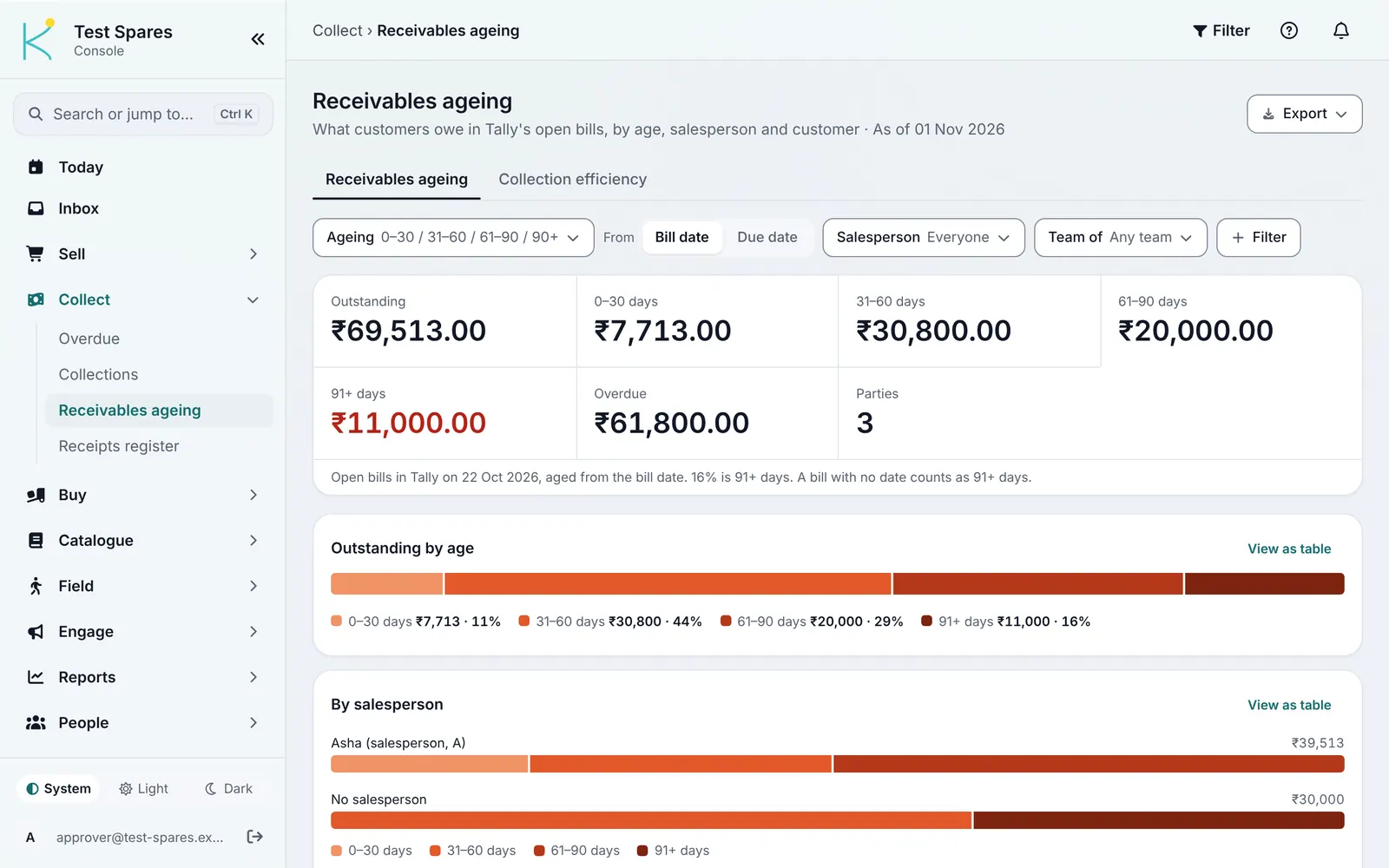
The Console's Receivables ageing report: what customers owe in 0–30, 31–60, 61–90 and 91+ days, as a bar, and the same by salesperson.
The real apps, with sample data from a test company
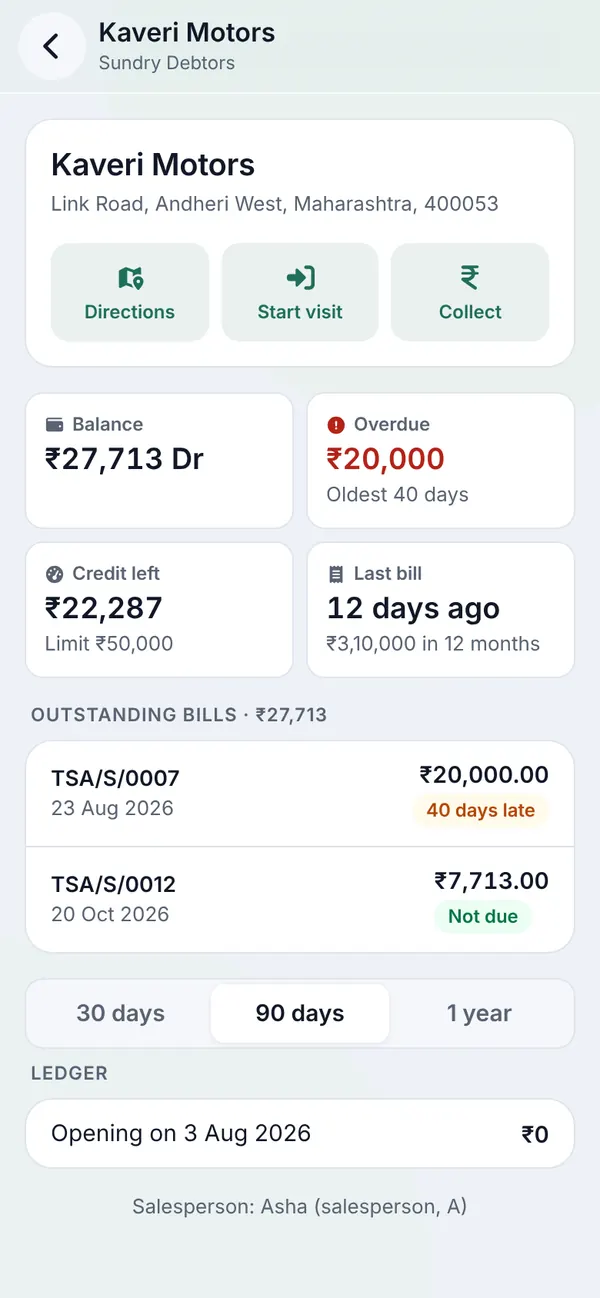
The field app's page for a customer: balance, overdue amount, credit left, the outstanding bills with how late each is, and buttons for directions, starting a visit and collecting.
The real apps, with sample data from a test company

The real apps, with sample data from a test company

  • For your customersTheir own ordering appThey order, pay and check their account without calling you.
  • For your teamWork from the phoneSales, collections, deliveries and attendance, recorded as they happen.
  • For youOne control roomEvery figure of the business on one screen, as of today.
  • Always onAI that watchesIt tells you what is unusual before it becomes a problem.

What you get

Four things a modern business does better

Sell more

Your customers stop waiting for someone to pick up the phone. They order from your own app and website at any hour, at their own price.

  • Search by name, code, voice or a photo.
  • Offers shown as stories, made with AI in a minute.
  • One tap to order the same again.

WithCustomer appWebsiteKavasa Retail

Get paid faster

You always know who owes you, how much, and since when. Reminders go out without anyone remembering to send them.

  • Overdue by customer and by salesperson.
  • Payment reminders on WhatsApp, SMS and email.
  • Collections recorded at the customer's door.

WithConsoleKavasa Field

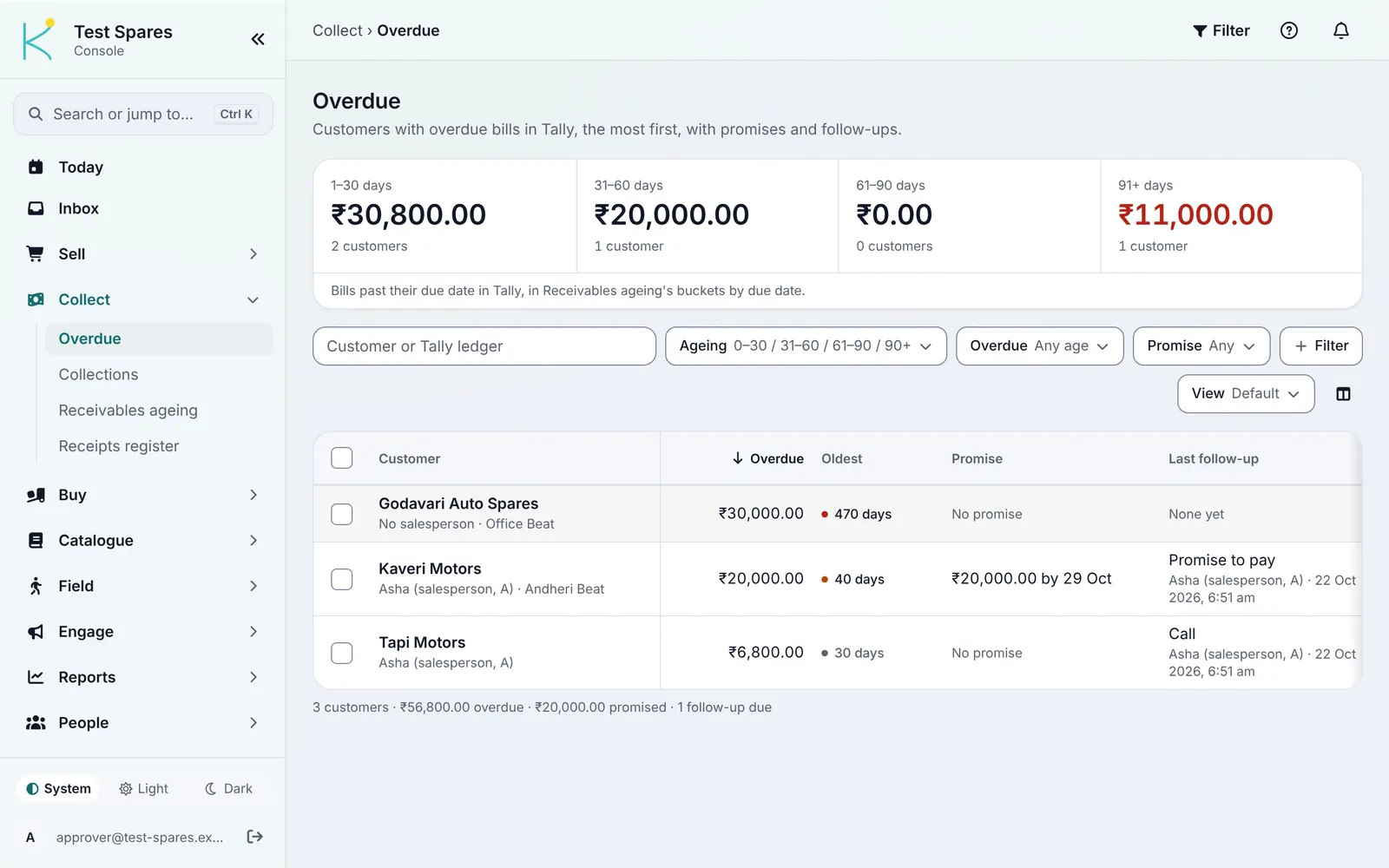
The Console's Overdue list: customers with overdue bills in TallyPrime, the oldest bill's age, promises to pay and the last follow-up.
The real apps, with sample data from a test company

Run a tighter operation

Everyone who works outside the office works from their phone, so the day is recorded as it happens and nothing is written up later.

  • Visits, orders and expenses from the phone.
  • Attendance at the start of the day.
  • Quicker picking and packing in the warehouse.

WithKavasa FieldWarehouse appMessenger

The field app's page for a customer: balance, overdue amount, credit left, the outstanding bills with how late each is, and buttons for directions, starting a visit and collecting.
The real apps, with sample data from a test company

Decide on numbers you can trust

Sales, collections, stock and overdue on one screen, each figure defined once and matching your books. No more asking three people for one number.

  • One definition for every figure, the same on every screen.
  • Customer 360, Item 360 and receivables by age.
  • Plan against actual, and answers in plain words.

WithConsoleBusiness analyticsAI assistant

The Console's Receivables ageing report: what customers owe in 0–30, 31–60, 61–90 and 91+ days, as a bar, and the same by salesperson.
The real apps, with sample data from a test company

The apps

An app for every part of the business

Each one does a single job well. Together they share one record of your customers, orders, stock and money.

Kavasa Messenger

Every call and message, on record

Conversations between your customers and your staff, and among your staff, happen in your company's own app. They stay with the business when a person leaves.

  • Customers and staff: chats kept against the customer.
  • Staff with each other: groups, voice notes and files.
  • Calls are recorded from their start, with everyone told; messages are kept the same way.
See the app
Warehouse app

Pick and pack faster, with fewer mistakes

Orders reach the warehouse floor as pick lists on a phone, in the order of your racks. Nobody walks the godown twice or packs from a printout.

  • Pick lists in rack order, several orders in one round.
  • Packing with photos, checked by a second person before the invoice.
  • Store pickup, returns and stock counts on the same phone.
See the app
  • Your customers

    Customer app

    Your own app on Android and iPhone. Customers order, pay and see their account.

  • Your customers

    Website

    Your own online shop, with every product on a page search engines can find.

  • Sales team

    Kavasa Field

    Routes, visits, orders, collections and expenses from the phone.

  • Counter staff

    Kavasa Retail

    Fast billing at the counter, with cash, UPI and credit, and a till for each cashier.

  • Your suppliers

    Kavasa Supplier

    Suppliers see your purchase orders, answer requests for quotes and track their payments.

  • The office

    Console

    Catalogue, pricing, customers, orders, reports and rights, in one place.

  • Owners and managers

    AI assistant

    Ask about your business in plain words, and let it draft the next step.

  • Your accounts

    Integrations

    Keeps Kavasa in step with TallyPrime, ERPNext and your online stores.

Sample conversations and items.

AI built in

Let AI watch your business, and help you run it

You cannot read every report every day. Kavasa does, and tells you what needs your attention.

It watches every night

While you sleep

Each figure is compared with its own usual range. What is unusual reaches the right person in the morning. Sample findings.

Ask in plain words

AI assistant

Connect Claude or ChatGPT with your own sign-in. It sees only what your role allows.

It drafts, you decide

Always a person

It prepares offers, purchase orders and reminders. Nothing is sent or posted until someone approves it.

How the assistant works

How you start

Modernising should not be a project

You keep your accounting software and your way of working. Kavasa is added around it.

  1. Step 1

    Connect your accounts

    Kavasa reads your items, prices, customers and bills from the software you already keep them in.

  2. Step 2

    Switch on what you need

    Start with one app, such as ordering or collections. Add the rest when you are ready.

  3. Step 3

    Invite your people

    Customers and staff sign in on their own phones. Each sees only what is theirs to see.

Getting started, step by step

Who it is for

Every leader gets their own view

  • Owner

    The day's sales, collections and overdue on your phone, and what is unusual first.

  • Sales head

    Plan against actual for every salesperson, route and customer.

  • Finance head

    Receivables by age, collections verified before they reach the books.

  • Operations head

    Orders ready to fulfil, picking, packing and dispatch on phones.

  • IT head

    Rights for every record, an audit trail, and your data yours to export.

Works with what you run

Keep your accounting software

Kavasa stays in step with your books, so nothing is typed twice. It connects to TallyPrime and ERPNext; other ERPs are connected on request.

  • TallyPrime
  • ERPNext
  • Shopify
  • WooCommerce
  • WhatsApp
  • Claude
  • ChatGPT

How it connects

FAQs

Questions owners ask

Cannot find your answer? Talk to us

What exactly is Kavasa?

A set of apps on one platform: an ordering app and website for your customers, phone apps for your team, a Console for the office, and an AI that watches the figures. They share one record of your business.

Is it only for distributors?

No. Any business that sells to customers, collects payments and has people working outside the office can use it: trading, distribution, retail, manufacturing and services. It was built with Sterling Spares, an auto-parts distributor in Kolkata.

Do we have to change our accounting software?

No. Kavasa runs beside it and keeps in step with it. It connects to TallyPrime and ERPNext; other ERPs are connected on request.

Terms, section 7: Your accounting software stays your system of record

What does it cost?

Tell us which apps you need and the size of your team, and we send you a proposal.

The rest is in our privacy policy and terms of use.

See your own business in Kavasa

A walkthrough with your items, your customers and your prices.

How you start
Book a demoTalk to us