
Business analyticsIn the Console, on any computer or phone
Know a customer before you pick up the phone
What a customer owes is in the accounts, what they ordered is in the order book, and what was said is in someone's head. Customer 360 puts them on one page, so anyone who speaks to the customer starts from the same facts.
How it works
Step by step
- Step 1
Open the customer
From search, a report or a list. The header gives the figures that matter today.
- Step 2
Read by section
Money, sales, service and contact history, each with its own list.
- Step 3
Act from the page
Add a note, set a task, send a statement or start an order for them.
What is in it
In detail
The header
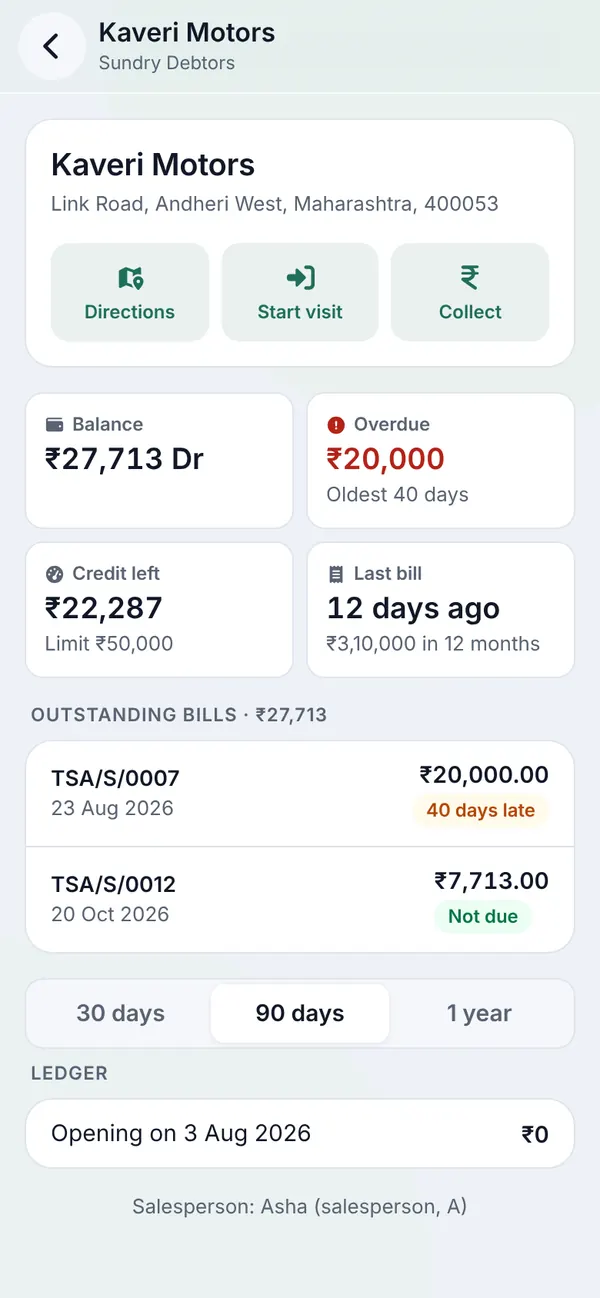
Balance, overdue and its oldest days, credit limit and credit left, last order, payment and visit.
Performance by month
Sales, returns, invoices and what they owe, month by month, with margin for roles that see cost.
What they have stopped buying
Items and brands a customer used to buy and no longer does.
A timeline
Orders, deliveries, payments, visits and messages in one list, filtered by kind and date.
Calls and messages
Every message sent to the customer, and calls logged by staff or made in the apps.
The same page in the field
A salesperson sees their customer's balance, overdue bills and ledger in Kavasa Field.
FAQs
Questions people ask
Does everyone see the whole page?
No. Each part shows by the person's rights: a salesperson sees their own customers, and cost or margin only shows to roles that may see it.
Is there the same for an item?
Yes. Item 360 shows one item's stock and its age, sales, purchases, customers, prices and margin, and opens from any report.
The rest is in our privacy policy and terms of use.
More in Business analytics
Decide on numbers you can trust
See your own figures, defined once
A walkthrough with your items, your customers and your prices.
How you start